 onepard
Let customers use your website just by asking.
Onepard learns what customers can do on your website. They ask in chat, Onepard handles the request on your site, and they get the result in the same conversation.
From a question to the right class
A visitor asks if the school teaches beginners at Northside Pool. Onepard says yes. The visitor asks for a Saturday morning class, so Onepard looks up the timetable and brings back the 10:30 a.m. class in the same chat.

What can customers get done in chat?
Customers can ask in their own words and get a time, a document, their account details or a request they can send through your site.
- Find the right option
Find trains from London to York on Friday morning.
Journeys for the route and date the traveller asked for.
- Get a result or download
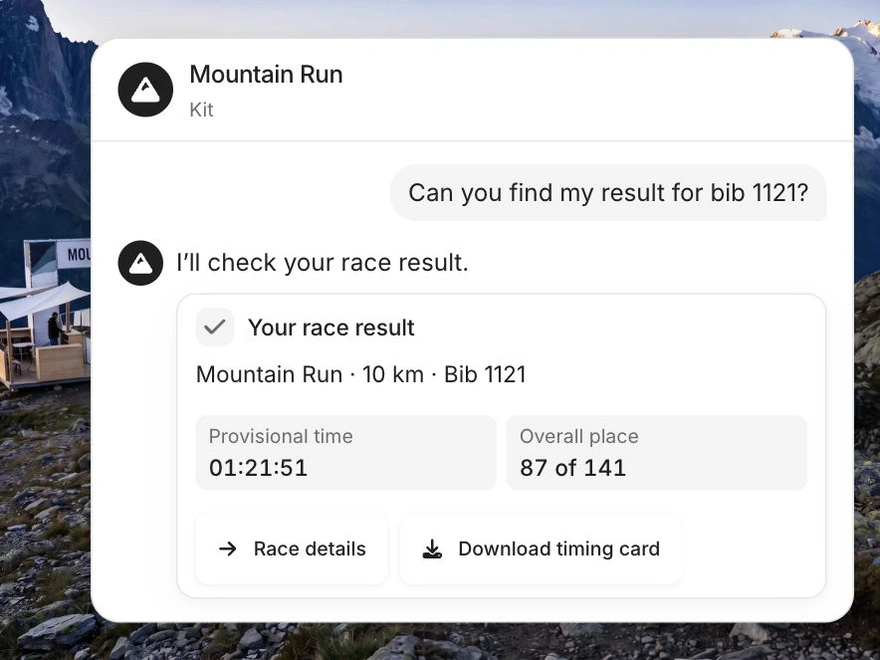
Get my timing card for bib 1121.
Their race result and a button to download the timing card.
- Look up account details
Show me my latest order.
Their order details after signing in to their account on your website.
- Send a request
Send a repair request for my bag.
The request details and a button to send it through the repair shop’s website.
Help customers finish what they came to do
A customer asks about a broken bag handle. Onepard prepares the repair request using the shop’s website, and the customer sends it from chat. The shop receives the details it needs to take the request from there.
When someone needs a quote, callback or help from your team, they can fill in a short form in chat. You get their enquiry by email.
See the enquiry form and email
Take action wherever customers chat
Give customers the same actions in your bottom chat box, corner chat bubble and shareable chat page. From a page on your site, they can ask about the item they’re looking at and follow up in the same conversation.
Common questions
Do I have to set up each action myself?
Start with your website address. Onepard learns what people can do there as it learns about your business. Open your chat and try a task your customers already come to your site to do.
Can a customer check an order they’ve already placed?
Yes. They can ask for their order details in chat. If your site requires sign-in, they use their own account first.
What happens before something is sent or changed?
Customers see the details in chat before they decide whether to send a request or make a change on your website. They can confirm it or cancel.
Can customers keep chatting after an action?
Yes. After finding a class, for example, a customer can ask what to bring or ask Onepard to find another time in the same conversation.
Try Chat Actions on your website
Add your website, open your chat in Chat settings and try a task your customers already come to your site to do.